
 Dan·16 November 2026·6 min read
Your Free Supabase Database Might Switch Itself Off
This morning an email landed from Supabase: the database behind this website was going to be paused for inactivity. That was a surprise, because we had already built something to stop exactly that happening, and it had been running every day for two weeks.
If you run anything on Supabase's free plan, a booking form, a contact form, an admin area, this is worth five minutes. A paused database does not announce itself to your visitors. The form just stops working.
- quiet days before a free project is paused
- 7
- small write a day keeps it awake
- 1
- a month for Pro, where pausing stops
- $25
Why Supabase pauses free projects
Supabase gives you a proper Postgres database for free, which is brilliant. The catch is that a free project which sees no activity for a week gets paused to save resources. Your data is safe and you can restore it from the dashboard, but until someone does, anything that talks to that database fails.
That is fine for a side project you are playing with. It is not fine for a website where the database only gets used when a customer books something. A quiet week in December and your booking form is quietly broken.
It fails silently
Visitors do not see "database paused". They see a form that spins and never sends. You find out when someone rings to ask why nobody replied.
The job we already had
Two weeks ago we added a keep awake job to this site. Vercel, which hosts the website, can run a scheduled task called a cron job. Ours called a small route on the site every morning at 6am, and that route ran a query against the database.
So why the warning? The query it ran was a tidy up: delete any old records from one table. Most mornings there was nothing old to delete, so the query ran and changed nothing.
A query that changes nothing may not count as activity. Ours ran every day and Supabase still thought nobody was home.
I cannot see inside Supabase's activity check, so I will be straight with you: that is our best explanation rather than a confirmed fact. What I can say is that the job was firing, the database answered, and the warning came anyway.
The fix
The change is small. The daily job now writes one throwaway row to the database, and the next day's tidy up deletes it. A write is unambiguous activity.
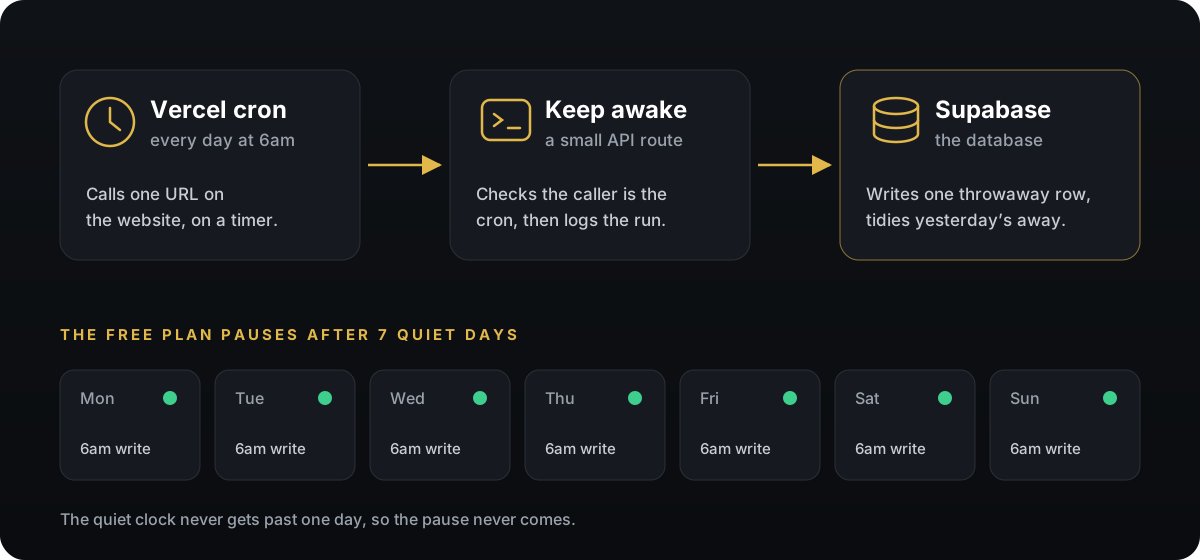
One line in vercel.json tells Vercel to call the route every morning. Vercel's free plan allows a daily job, which is all this needs.
The route checks who is calling. Vercel's own scheduler gets to write a row. Anyone else who finds the address just gets a read, so nobody can fill your table from outside.
Each run deletes rows older than an hour, then writes a fresh one. The table never holds more than a single keep awake row.
Every call now writes a line to the logs, so you can see it working rather than assuming it is.
Here is the schedule:
{
  "crons": [{ "path": "/api/keep-awake", "schedule": "0 6 * * *" }]
}
And the heart of the route:
const fromCron = (req.headers.get("user-agent") ?? "").startsWith("vercel-cron");

const db = createAdminClient();
await db.from("keep_awake").delete().lt("created_at", anHourAgo());
if (fromCron) {
  await db.from("keep_awake").insert({ note: "still here" });
}
console.log(`Keep awake ran (${fromCron ? "cron, wrote a row" : "manual, read only"})`);
- Opens a URL, or runs a query that changes nothing
- Logs nothing when it succeeds
- You only find out it failed from a warning email
- Anyone can hit it and make it do work
- Writes a real row every day, then tidies it up
- Logs every run so you can check it
- Only Vercel's scheduler can write
- Small enough to read in one sitting
Where it went wrong, and what I learned
The first version of this job was built quickly with AI, and it did exactly what we asked: run a query every day. Nobody asked whether that query counted. The AI did not flag it, and I did not think to check, because "it runs every day" sounded like the job was done.
The second lesson was about proof. When the warning arrived, I wanted to know whether the job had even run. Our hosting plan keeps logs for a single day, and the job printed nothing when it succeeded, so there was no way to tell. Now every run leaves a line behind.
The rule I am taking away
If something matters enough to automate, it matters enough to log. "It probably ran" is not the same as seeing that it did.
Should you just pay instead?
Honestly, for anything a business depends on, maybe. Supabase Pro is $25 a month and paused projects stop being a thing. Keep awake jobs are widely used and nothing in Supabase's terms forbids them, but pausing is also how Supabase nudges people to upgrade, so the rules could change. For a small business site with a contact or booking form, a daily write is a sensible bridge. For a system you would lose money without, pay for the plan.
This is the same theme as the week AI tried to put our customer emails on the internet: AI builds the thing you describe, quickly and well, and the gaps are in what nobody thought to describe. If you want a second pair of eyes on the systems behind your site, that is part of what our website care plans cover.